


USPS tracking updates show where your package is and what stage of the shipping process it is currently in. Each status appears when a package is scanned at a facility or during delivery, helping customers follow the shipment from the sender to the final destination.
This guide explains every common USPS tracking status, what it means, why it appears, and what to do if your package seems delayed.
How USPS Tracking Works

USPS tracking works through barcode scanning. Every package receives a tracking number, and USPS employees scan the barcode at different points in the delivery network.
These scans generate the tracking updates you see online.
Typical tracking process:
- Shipping label is created.
- Package is accepted by USPS.
- Shipment moves through sorting facilities.
- Package arrives at destination processing center.
- Package is assigned to a delivery route.
- Shipment is delivered.
Each step produces a tracking update.
Understanding the USPS Delivery Journey
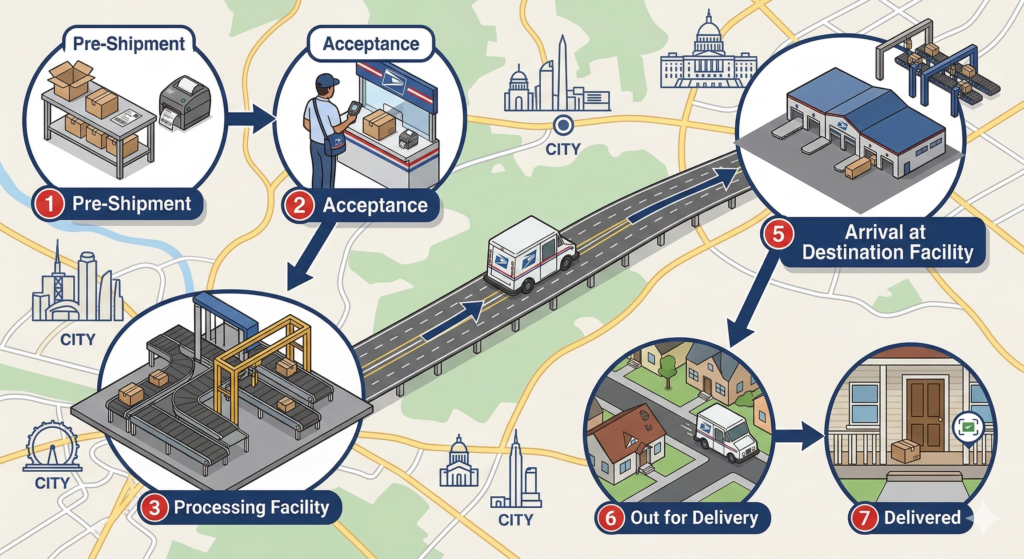
A package usually travels through multiple facilities before reaching its destination.
Typical USPS shipping route:
| Stage | What Happens |
|---|---|
| Pre-Shipment | Label created but USPS hasn’t received the package |
| Acceptance | USPS receives the package |
| Processing | Package sorted at distribution facilities |
| Transit | Shipment moves between facilities |
| Arrival | Package reaches destination facility |
| Delivery | Package goes out for delivery |
| Completed | Package delivered |
Tracking statuses correspond to these stages.
Pre-Shipment Tracking Statuses
These updates appear before USPS officially receives the package.
Shipping Label Created
Meaning:
The sender created a shipping label but USPS has not received the package yet.
Why it happens
- Online order was processed
- Seller prepared shipment
- Package waiting for drop-off or pickup
What to do
Usually nothing. Wait for USPS to receive the package.
If the status remains unchanged for several days, contact the sender.
USPS Awaiting Item
Meaning:
USPS expects to receive the package but has not scanned it yet.
Common reasons
- Seller hasn’t shipped the package
- Package waiting for pickup
- Shipment not yet scanned by USPS
This status typically changes within 24–48 hours after the package enters the postal system.
Acceptance Status
These updates appear when USPS receives the shipment.
USPS in Possession of Item
Meaning:
USPS has received the package and added it to the delivery network.
This update appears when:
- package dropped off at a post office
- USPS collects the shipment from a business
- package scanned at a sorting facility
The shipment will soon move to the next processing facility.
Accepted at USPS Origin Facility
Meaning:
The package has been accepted at the initial USPS facility where shipping begins.
After acceptance, the shipment begins moving through USPS distribution centers.
Processing and Facility Statuses

These statuses indicate the package is moving through USPS sorting centers.
Arrived at USPS Facility
Meaning:
The package has reached a USPS processing center.
Large distribution centers handle thousands of packages daily. Packages may pass through multiple facilities during shipping.
Seeing this update several times is normal.
Departed USPS Facility
Meaning:
The package has left the current processing center and is traveling to another facility.
This means the shipment is moving toward its destination.
Processed Through Facility
Meaning:
The package was sorted and processed at a distribution center.
During this step, USPS machines scan and route packages based on their destination.
In Transit Tracking Status
In Transit to Next Facility
Meaning:
The package is moving between USPS facilities on its way to the destination.
This is one of the most common tracking updates.
It usually appears while the shipment is:
- traveling by truck
- moving through distribution hubs
- transported between cities
It may remain in this status for several days if the shipment travels long distances.
Moving Through Network
Meaning:
USPS indicates the package is progressing through the postal network toward delivery.
This update typically appears during long transportation segments.
Destination Facility Status
Arrived at Destination Facility
Meaning:
The package has reached the USPS processing center closest to the recipient.
After arriving here, the shipment is sorted for the local delivery route.
Arrived at Post Office
Meaning:
The package has reached the local post office responsible for final delivery.
Delivery usually occurs the same day or the next business day.
Out for Delivery Status
Out for Delivery
Meaning:
The package has been loaded onto the delivery vehicle and is on its way to the destination address.
This status usually appears early in the morning when postal workers start their delivery routes.
Most packages marked Out for Delivery arrive the same day.
Preparing for Delivery
Meaning:
The package has reached the local post office and is being sorted for the delivery route.
This status appears shortly before Out for Delivery.
Awaiting Delivery Scan
Meaning:
The package was likely delivered but has not yet received the final delivery scan.
Sometimes USPS drivers deliver packages before updating the tracking system.
Delivery Attempt Status
Delivery Attempted – No Access
Meaning:
The postal worker attempted delivery but could not access the address.
Possible reasons include:
- gated property
- locked apartment building
- blocked mailbox
USPS may attempt delivery again or hold the package at the post office.
Notice Left
Meaning:
The postal worker left a delivery notice because the package required a signature or could not be delivered.
The notice includes instructions for rescheduling delivery or picking up the package.
Delivered Status
Delivered
Meaning:
The package has been delivered to the destination address.
Tracking may include details such as:
- delivered to mailbox
- left at front door
- delivered to parcel locker
- delivered to reception
Delivered to Agent for Final Delivery
Meaning:
The package was delivered to an authorized person who will complete the final delivery.
Examples include:
- apartment office
- building manager
- mailroom staff
International USPS Tracking Statuses
International shipments may include additional tracking updates.
Inbound Into Customs
The shipment has arrived in the destination country and is waiting for customs processing.
Customs Clearance Processing
Customs officials are inspecting the package.
This process may take several days depending on regulations.
Released from Customs
The shipment cleared customs and will continue through the local postal network.
Why USPS Tracking Sometimes Stops Updating
Tracking updates depend on barcode scans. If a package is traveling between facilities, there may be no scans for a while.
Common reasons include:
- long-distance transportation
- shipment waiting at sorting facility
- high package volume
- delays during transportation
Tracking typically resumes when the package reaches the next facility.
What to Do if USPS Tracking Is Not Updating
If your tracking status has not changed for several days:
- Check the estimated delivery date.
- Wait for the next facility scan.
- Confirm the shipping address.
- Contact USPS support if the package appears delayed.
Most packages continue moving even when updates temporarily stop.
What to Do if USPS Says Delivered but You Did Not Receive the Package
If tracking shows Delivered but you cannot find the package:
- Check around your property.
- Ask neighbors if they received the package.
- Check with apartment offices or mailrooms.
- Contact your local post office.
Sometimes packages are scanned as delivered slightly before they are actually dropped off.
Frequently Asked Questions
How often does USPS tracking update?
Tracking updates appear whenever the package is scanned during processing or delivery.
Why does my package say In Transit for several days?
This usually means the shipment is traveling between facilities or across long distances.
What does Arrived at Post Office mean?
The package has reached the local post office and will soon be delivered.
How long does Out for Delivery take?
Packages marked Out for Delivery are usually delivered the same day.
Conclusion
USPS tracking statuses help customers follow the progress of their shipments through the postal network. Understanding what each update means makes it easier to know when a package will arrive and what to do if delays occur.
By learning the meaning behind each tracking message, customers can better understand the shipping process and respond appropriately when problems arise.