
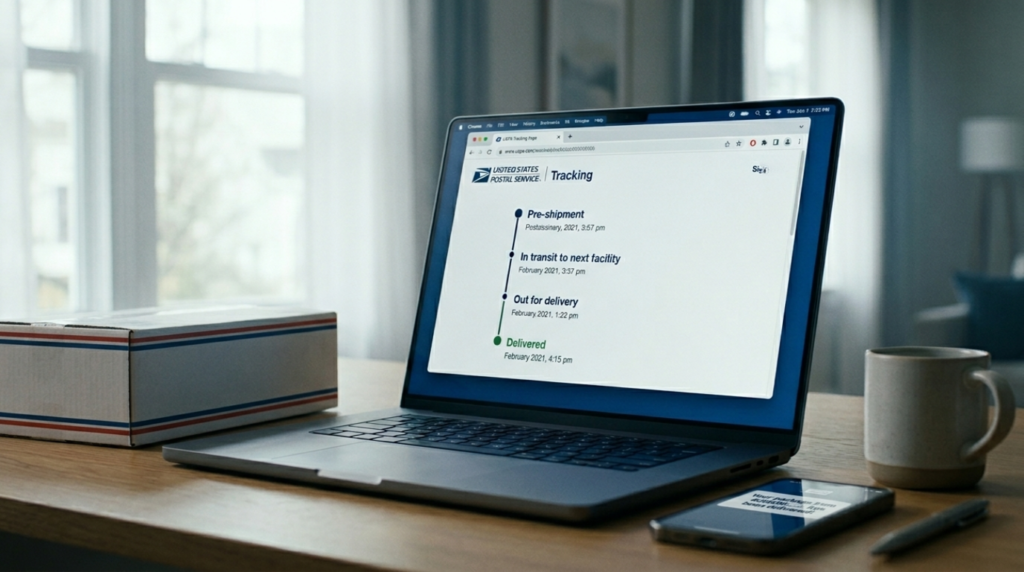
You open your email or tracking page and see a new USPS status, but you have no idea what it actually means or when you’ll really get your package. Scans like “accepted,” “in transit,” or “out for delivery” can feel vague, and gaps in tracking can spike your anxiety even more.
This guide explains every common USPS tracking status meanings in the order a typical package moves, and tells you exactly what (if anything) you should do next. read through once to understand how USPS tracking actually works and when it’s safe to relax.
How USPS tracking actually works

USPS tracking updates only when a package’s barcode is scanned at facilities or by carriers—not every truck ride or sort triggers a visible status. Gaps are normal and don’t signal problems.
Key Scan Triggers
- Acceptance at origin post office.
- Arrival/departure at sorting facilities.
- Hand-off to local carrier for delivery.
Why Gaps Happen
Carriers often skip scans during peak volumes like holidays. Between scans, packages move unseen via conveyors or vehicles. High scan accuracy (95%+) means brief pauses aren’t lost mail.
Realistic tip: Wait 5-7 days before inquiring.
USPS Tracking Statuses — What Each One Means
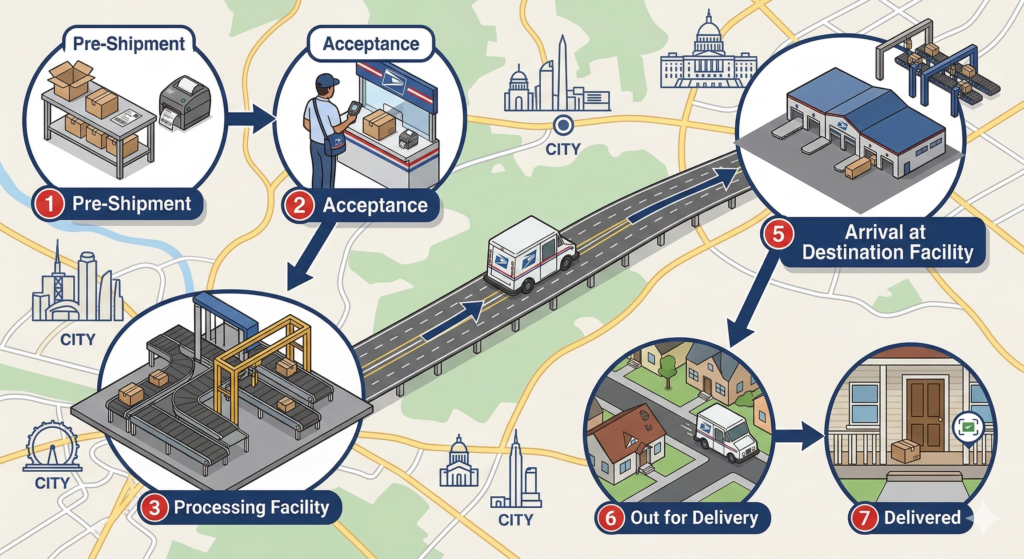
Pre‑shipment / label created
What this means:
“Pre‑shipment” or “label created” means the sender has generated a USPS label, but the package hasn’t been physically handed over to USPS yet. The item is still with the shipper, retailer, or fulfillment center, and no scans have registered in the USPS network. This status is common in online orders where the seller waits until multiple packages are ready before dropping them off in bulk.
What you should do:
Expect a change to “accepted” or “in transit” within 1–3 business days after you placed the order, depending on the seller’s processing time. If you’re past the seller’s stated processing window with no movement, check your email for shipping updates or contact the merchant first — USPS can’t act until the label is actually used.
Accepted at USPS facility
What this means:
“Accepted at USPS facility” means your package has physically entered the USPS system and received its first scan at a local post office or processing unit. From here it will be sorted into the next leg of transit (often a larger processing center or hub). This status is your first real confirmation that USPS has the box in hand.
What you should do:
From this point expect the next update (“in transit,” “arrived at facility,” or “out for delivery”) within 1–2 business days, though weekends and holidays can slow things down. If the status stays here for more than 2 full business days without a follow‑up scan, it’s reasonable to contact the originating post office or check your cluster article for “accepted but not moving” scenarios.
In transit to next facility
What this means:
“In transit to next facility” means your package is moving toward a downstream USPS hub — typically a larger processing or distribution center — usually by truck, plane, or carrier. This status can appear multiple times during a long‑distance shipment as the box hops between facilities. Carriers and drivers often don’t scan packages at every stop, so the status can “hold” for hours or even a full day.
What you should do:
A 12–24‑hour gap on this status is usually normal, especially during peak seasons or long cross‑country routes. If there’s no change for more than 2 business days, verify that the tracking number is correct and that the order actually shipped. If it still looks stuck, you can escalate via your local post office instead of the 1‑800 number for faster resolution.
Arrived at facility / departed facility
What this means:
“Arrived at facility” means your package has reached a specific USPS hub, such as a processing and distribution center, and is now being sorted for the next leg (often local delivery). “Departed facility” means it has left that hub and is heading toward the next point, usually a local delivery unit or sorting facility closer to you. These statuses are common on long‑distance or multi‑leg shipments.
What you should do:
Expect the sequence: “arrived at facility” → short processing time → “departed facility” → “in transit” or “out for delivery.” Scans can be sparse during busy shifts, so a short pause is normal. If the last scan is “departed facility” and you’re more than 2 business days past your estimated delivery window, use your local post office contact instead of the national line for more context.
Out for delivery
What this means:
“Out for delivery” is one of the most hopeful statuses: your package is on the mail carrier’s vehicle and is scheduled for delivery today. In many cases it means the box is already en route or being delivered along the route. However, carriers can’t scan every address, so the status doesn’t always update in real time.
What you should do:
Assume delivery is very likely today, especially if the scan is before noon. If it’s late in the day and still shows “out for delivery,” give it until the end of the official delivery window. If it remains “out for delivery” overnight with no change, check the next day’s status and consult the dedicated USPS out for delivery but not delivered a complete guide article for troubleshooting.
Preparing for delivery
What this means:
“Preparing for delivery” typically means your package has arrived at the local delivery unit and is being sorted into the carrier’s route for the day. It’s one step before “out for delivery” and signals that USPS is actively getting it ready for the final leg. This status is common in the morning hours before the carrier hits the road.
What you should do:
Expect “out for delivery” within a few hours in most cases, especially on weekdays. If the status stays the same into the late afternoon with no change, it may be delayed due to volume or weather; check the linked cluster preparing for delivery article for what to watch for and when to call your local post office.
Expected delivery by 9pm
What this means:
“Expected delivery by 9pm” means USPS has scheduled your package for delivery today and expects it to be placed by the carrier’s official delivery window (usually 9 p.m. locally). This status often appears in the morning or early afternoon and is common for Priority Mail and some First‑Class packages.
What you should do:
Treat this as a strong signal that your package should arrive today, though it can shift slightly due to weather, traffic, or route changes. If it’s already past 9 p.m. and the status hasn’t changed, wait until the next day’s first scan before contacting USPS. For a deeper look at how this line of communication works, check the full guide on expected delivery by 9pm.
Awaiting delivery scan
What this means:
“Awaiting delivery scan” usually means your package has reached the local delivery unit or carrier’s vehicle and is ready to be delivered, but the final handheld scan hasn’t registered yet. This can happen when the carrier is still active on the route or when the device is offline or slow.
What you should do:
Give it until the end of the delivery day or the next morning’s first scan. If it stays on “awaiting delivery scan” for more than 24 hours past your expected delivery, call your local post office instead of the 1‑800 number for a faster, more accurate check. For a full breakdown of this scenario, see the detailed cluster article on awaiting delivery scan USPS.
Delivered to agent for final delivery
What this means:
“Delivered to agent for final delivery” means USPS has handed your package to a third‑party delivery partner (such as a local courier or regional agent) that will complete the last mile. This is common for some residential areas or multi‑unit buildings where USPS contracts out final delivery.
What you should do:
Watch for a new tracking update from the partner carrier or a local delivery notice. If there’s no follow‑up within 24 hours, contact your local post office or check the full cluster article on USPS delivered to agent for final delivery for troubleshooting steps and contact options.
Delivered but package not there
What this means:
“Delivered” means the USPS scanner recorded the package as being placed at your address, mailbox, or parcel locker. In reality, it can be hidden, mis‑delivered to a neighbor, taken by someone else, or left in an unexpected spot. Sometimes the scan is accurate but the location detail is wrong.
What you should do:
Wait 24 hours, check with neighbors and any building staff, and inspect common hiding spots (porch, side gate, garage). If it’s still missing after that, call your local post office directly and ask for a “delivery record” or “delivery point” confirmation. If nothing shows and it’s been more than 7 days, you can file a missing mail inquiry. For a complete walkthrough of this frustrating situation, see the full guide on tracking status changes from delivered to in‑transit or missing.
No access to delivery location
What this means:
“No access to delivery location” means the carrier couldn’t safely or legally reach the delivery address—for example, a locked gate, no‑pet‑allowed area, or security‑restricted building. The package is still with USPS and will usually be held for a return scan or redirected.
What you should do:
Check for a redelivery notice or call your local post office to clarify if the package will be held at the post office or rescheduled. If you consistently see this status, you may need to adjust your delivery instructions (e.g., leave at door, alternate address). For a full explanation of how this status works, see the cluster article on what “no access to delivery location” means USPS.
Delivery exception
What this means:
“Delivery exception” is a general flag that something went wrong during delivery—this could include weather, road closures, carrier unavailability, or an issue with the address. It doesn’t always mean the package is lost; it just means the normal delivery routine was interrupted.
What you should do:
First, check if the status changes to a new delivery attempt, return, or re‑delivery notice within a day or two. If it stays on “delivery exception” for more than 2 business days, contact your local post office to ask what the specific exception was and when the next attempt is scheduled. For a deeper dive into how exceptions are handled, see the full delivery exception USPS guide.
Why your tracking hasn’t updated
Tracking stalls spark anxiety, but most have mundane explanations beyond “lost package.” Updates depend on scans, which carriers skip under pressure.
Common Reasons
- Missed scans: Carriers prioritize delivery over scanning during rush; Many users share tales like “stuck in transit 3 days—delivered next morning.”
- Weekend surges: No scans Saturday-Sunday at many facilities; volume triples.
- Weather delays: Storms halt trucks, backlog sorts.
- Facility overloads: Peak seasons overwhelm hubs, pausing scans 24-48 hours.
When to Act
Wait it out unless:
- Priority Mail: No update after 5 business days.
- First-Class: No movement by day 15.
Check Informed Delivery for previews. 95% resolve without calls.
What to do if your package shows delivered but isn’t there
A “delivered” status without your package feels like a gut punch—it’s the top USPS complaint trigger. Don’t panic; 80% resolve without intervention.
Top Causes
- Driver error: Scanned early or at wrong address; common in apartments.
- Porch pirates: Theft hits 1 in 200 deliveries; gaps peak at holidays.
- Misdelivery: Left with neighbor, lease office, or locker you missed.
Quick Actions
- Wait 24 hours—scans can update retroactively.
- Check neighbors, shared spaces, Informed Delivery previews.
- Call your local post office (find via ZIP on USPS.com)—skip 1-800 line.
- File Missing Mail search after 7 days with photo ID, tracking #.
For full guide on status flips like “delivered to in-transit,” see full guide linked delivered but package not there. Stay calm—carriers recover most.
USPS tracking — frequently asked questions
1. How long does USPS tracking take to update?
USPS tracking usually refreshes within a few hours after a scan at a facility or by the carrier, though it can take up to 24 hours during busy periods or in remote areas. If there’s no change for more than a full business day, first confirm the tracking number is correct and the package has actually been dropped off; long gaps are often normal, especially over weekends or holidays.
2. Why does my tracking say in transit for so long?
“USPS in transit to next facility” can stay the same for several days because the system doesn’t scan every truck, plane, or hub handoff, especially during peak seasons or long‑distance routes. Carriers often skip scans to keep up with volume, so a 24–48‑hour pause on “in transit” is usually fine as long as you’re still within the estimated delivery window.
3. Can USPS tracking be wrong about delivery?
Yes—USPS tracking can occasionally show “delivered” when the package is still in transit, or mark it as “out for delivery” before it actually leaves the facility. An audit found that a significant portion of USPS tracking messages don’t match the real‑world location, so if the status doesn’t match your reality, wait 24 hours, check with neighbors, and then contact your local post office with a copy of the tracking.
4. What happens when USPS tracking stops updating?
When USPS tracking stops, it could mean a missed scan, a backlog at a facility, a technical issue, or weather‑related delays rather than a lost package. For Priority Mail, wait about 5 business days with no movement before contacting USPS; for First‑Class or standard mail, allow up to 15 business days before filing a missing‑mail inquiry through your local post office.
5. How do I contact USPS about a missing package?
The fastest way to get help is to call or visit your local post office with the tracking number, order details, and estimated delivery date; they can check scan logs and delivery records more effectively than the 1‑800 number. If the package still hasn’t appeared after 5–7 days for Priority Mail or 15 days for First‑Class, ask for a “missing mail” form or file a missing‑mail inquiry online through the USPS website.
Stay ahead with USPS Informed Delivery
USPS Informed Delivery lets you preview incoming mail and packages daily—beating tracking delays by 1-2 days. Sign up free at informeddelivery.usps.com with your USPS account; it scans your mailbox virtually.
Stay Proactive
- Spot deliveries early via email or app notifications.
- Verify expected items against tracking gaps or “delivered” scares.
- Troubleshoot glitches fast—no waiting on scans.
Get ahead of status stalls. For SMS alerts, see does USPS send text messages about delivery a complete guide. Informed Delivery down? Check USPS informed delivery not working.